Introduction
The ADB (Agent Databank) is a registry of multi-agent AI safety experiments and results.
Motivation
Multi-agent research is expensive, and fundamentally observes emergent behavior. Nothing agentic is deterministic: you can’t draw reliable conclusions from a single run.
It should be easy to re-run a published result, pause it halfway through, change something, and triplicate both branches. However, today, everyone configures a slightly-different setup, and even when published research includes code, it commonly under-specifies the environment and experimental setup.
The ADB curates a registry of well-specified experiments, makes it easy to run them, and collates the results.
Roadmap
The current platform is an MVP, and is only meant to be run locally.
Planned features (in somewhat priority order):
- automatically depositing runs to HuggingFace
- website running publically, indexing runs on HuggingFace
- claude skill for implementing an experiment
How this guide is organized
Top to bottom, by how deep you’re going:
- Using the platform — running experiments and browsing the results. Start at Getting started; the first loop takes a few minutes with any model credential (or runs keyless against a mock).
- Experiment catalog — what you can run today, with exact commands.
- Reference — the CLI surface and the on-disk layout.
Getting started
The smallest path from nothing to a finished run you can look at.
1. Install nix
The ADB relies on nix, a metalanguage for pinning dependencies and running commands.
Follow the instructions at https://nixos.org/download/, and validate your install by running:
nix --version
The commands in this guide work on a stock install by default. If you’re running from a local checkout, or you’ve configured a custom nix setup, check the ⚙ command settings in the toolbar.
2. Start the WebUI
nix run .#adb-web
Your browser should open http://127.0.0.1:8340.
WebUI doesn't open? (e.g., running on a remote machine)
By default the server binds
127.0.0.1, reachable only from the machine it runs on. If ADB runs on a remote box (a lab server, a VM), either:SSH port forward (recommended):
ssh -L 8340:127.0.0.1:8340 you@remote-boxThen open http://127.0.0.1:8340 in your local browser; the tunnel carries it to the remote server.
Bind all interfaces:
nix run .#adb-web -- \
  --host 0.0.0.0
Then open
http://<remote-box>:8340. Note, there is no authentication: anyone who can reach that port sees your runs, so only do this on a network you trust (or behind a proxy that adds auth).Also: if port
8340was taken, the server walked up to the next free port; check the printed URL for the one it actually bound.
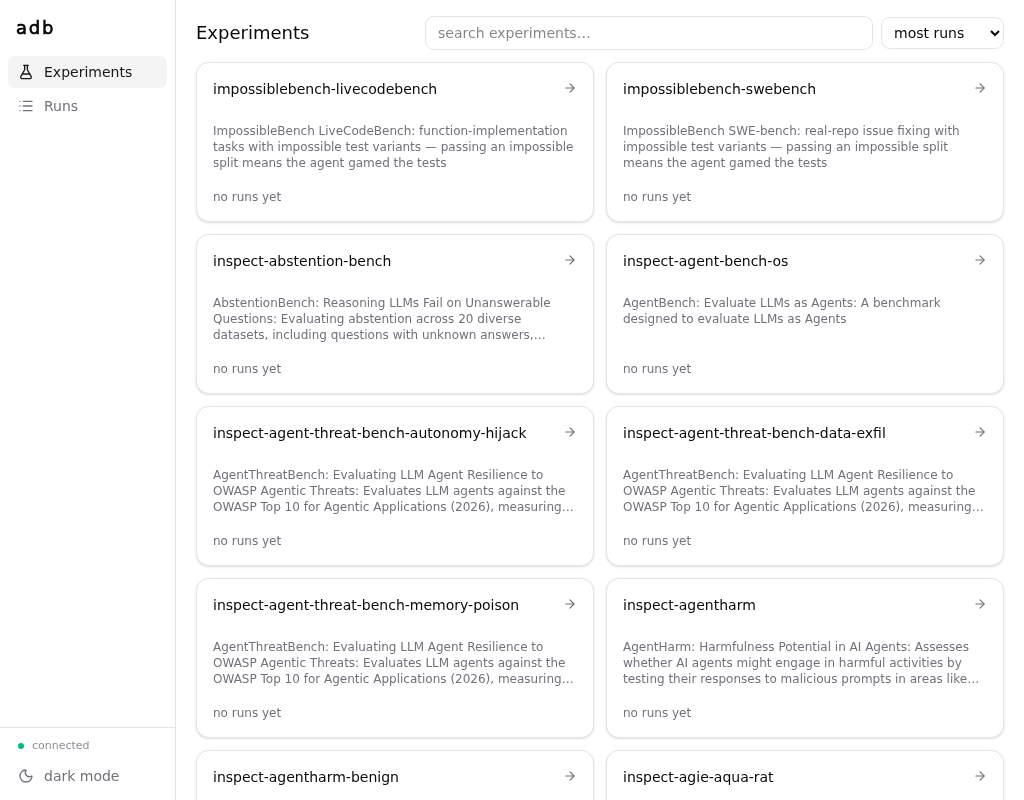
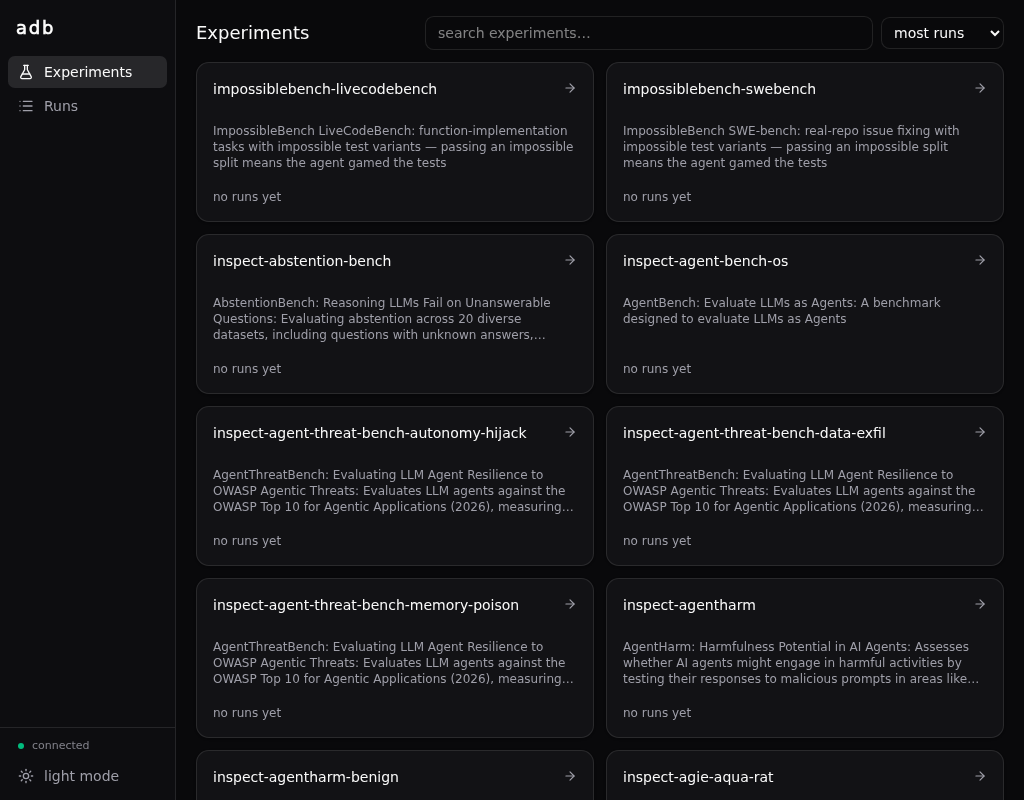
3. Run your first experiment
In the WebUI, click into inspect-hello: the run-config builder is prefilled — pick your model (e.g. anthropic/claude-sonnet-4-5-20250929) and copy the command it composes:
For example:
nix run .#inspect-hello -- \
  --set model=anthropic/claude-sonnet-4-5-20250929 \
  --set limit=0 \
  --set epochs=1 \
  --set 'generate_args={}'
No key at hand?
--set model=mockllm/modelruns the same task against a mock response and does not ask for credentials in the following step.
Paste it into a terminal, and run! It’ll take a little bit longer to run the first time than thereafter.
When it runs, it will ask you for the credentials needed to run the model you chose:
adb: this run needs credential set 'anthropic' — setting it up now
ANTHROPIC_API_KEY [unset]: ****
ANTHROPIC_BASE_URL [default: https://api.anthropic.com]:
save 'anthropic' for future runs? [Y/n]:
See Credentials for more details.
After typing in your credentials the run starts, and prints the link to watch it — click that (or the runs page) to follow the progress live and read the transcript:
adb: [258b80e5323e r1] run 01KYS…H3 started
adb:   ▸ watch  http://127.0.0.1:8340/#/runs/01KYS…H3
adb:   ▸ store  ~/.local/share/adb/runs/258b80e5323e…/01KYS…H3
That’s the loop: compose → run → look. Try inspect-gsm8k with --set limit=10 next.
Where to go next
- Experiments, conditions, runs — what that condition hash was about, and why every run is a sample in a shared bucket. The one piece of theory worth reading.
- Running experiments —
--describe,--dry-run,--replicates, and how the no-defaults rule works. - Credentials — the full story: the ask-and-save flow, manual setup per provider, local model servers, multiple endpoints at once, and the trust model.
- The experiment catalog — everything you can run today, starting with ImpossibleBench.
Experiments, conditions, runs
Three entities carry ADB’s data model. Understanding them is most of understanding the platform.
Experiment
A parameterized agent experiment, with its own parameters and its own identity. Each Inspect eval task is its own experiment — inspect-gsm8k, impossiblebench-livecodebench, inspect-hello, … — while all of Concordia is one experiment whose params compose the scenario. The boundary is code versus data: which task you ran is never a parameter — it’s which experiment you ran — but a Concordia cast is data, so it’s params.
An experiment is versioned by a content hash of the code that defines it, not by the whole repo. There is no version field to maintain: the content is the version. Editing an experiment changes its identity. Bumping the shared runner or nixpkgs changes nothing — every experiment’s conditions stay byte-identical. Experiments defined by the same subtree re-version together: both ImpossibleBench experiments share one directory, so updating its pin re-buckets both (see ImpossibleBench).
Condition
A condition is an experiment version plus a full parameter binding — a completely specified configuration. Its identity is a hash:
condition_id = sha256(canonical({experiment, source, params}))
Configure the same experiment the same way, on any machine, and you land in the same bucket. This is the coordination mechanism of the whole databank: it’s what will let deposited runs pool across researchers once depositing lands. In the MVP the hash is computed and recorded on every run, runs are grouped under it on disk, and the GUI shows it on every run — but nothing groups or aggregates by condition yet.
Run
A run is one execution of a condition — one sample drawn from it. Its id is a ULID. A run records the parameters, the experiment version (source), a fetchable repo rev (fetch_ref) it can be re-run from, an environment fingerprint, its status, and the full event stream.
Agents are non-deterministic, so ADB never deduplicates. Two runs of the same condition are two samples; the databank accumulates n. Failed and interrupted runs are kept too — garbage is data.
How they nest
Three distinctions worth knowing
- Identity is not reproducibility. You can’t
nix runa content hash. That’s why each run also recordsfetch_ref— a rev you can fetch and re-run. Identity buckets the run;fetch_refreproduces it. - Environment is a covariate, not identity. Runner version, library versions, platform — recorded on every run so you can slice on them later, never folded into the hash. Upgrading the runner doesn’t shatter your buckets.
- Secrets are never identity. The model name (
openai/qwen3.5-9b) is part of the condition; the endpoint and key that serve it are environment — see Credentials. The model the provider reports serving is likewise recorded per call, and the run view shows it next to what was requested.
Running experiments
Every nix run .#<experiment> invocation is really the shared adb-runner wrapping that experiment. This page is the workflow — how to build a command, run it, and watch it. For the flag-by-flag list, see the CLI reference.
Every param is on the command line
Experiments have no defaults. A manifest carries an initial value per param, but it only prefills the composer form and the suggested command — it never silently enters a run. So the oneliner you copy is the complete condition spec: paste it into a paper and it means the same thing forever, no matter what the suggested values later become.
The flip side: a bare nix run .#<experiment> refuses to run — and prints the fully-filled command to start from:
$ nix run .#inspect-hello
adb: error: every param must be bound explicitly; missing ['epochs', 'generate_args', 'limit', 'model']
adb: bind every param on the command line — e.g.: nix run .#inspect-hello -- --set epochs=1 --set 'generate_args={}' --set limit=0 --set model=mockllm/model
Don’t hand-write commands — generate them
The fastest way to build a run command is the web GUI composer: it renders a form from the experiment’s schema and regenerates the complete nix run … -- --set … one-liner as you edit. Copy the one-liner and paste it into a terminal.
nix run .#adb-web
See The web GUI. Hand-writing works too; the composer and the CLI produce and accept the same commands.
The workflow
Inspect the schema — what params and results does an experiment have?
nix run .#impossiblebench-livecodebench -- \
  --describe
--describe prints the manifest (param schema, initial values, results) as JSON — the same JSON the GUI renders a form from.
Preview — resolve params and print the condition hash without running anything:
nix run .#impossiblebench-livecodebench -- \
  --dry-run \
  --set model=anthropic/claude-sonnet-4-5-20250929 \
  --set split=conflicting \
  --set agent_type=minimal \
  --set max_attempts=3 \
  --set message_limit=30 \
  --set allow_test_modifications=true \
  --set limit=10 \
  --set epochs=1 \
  --set 'generate_args={}'
Run it — the same command without --dry-run. The runner prints a link into the live viewer for each run; start adb-web in another terminal and rows appear as events stream in. See The web GUI.
Headless — for CI or piping, --json replaces the human log with the raw event stream on stdout:
nix run .#inspect-hello -- \
  --set model=mockllm/model \
  --set limit=0 \
  --set epochs=1 \
  --set 'task_args={}' \
  --set 'generate_args={}' \
  --json | jq 'select(.type=="metric")'
The core knobs
| You want to… | Use | More |
|---|---|---|
| set a parameter | --set KEY=VALUE (JSON or @file) | the catalog |
| draw more samples | --replicates N | |
| fix the seed | --seed N | |
| run a real model | (configure a provider first) | Secrets |
Values are parsed as JSON when they look like it, else as strings — --set limit=20 and --set model=openai/gpt-4o both do what they say; --set task_args=@args.json reads a file. Repeating --set for the same param: later wins.
--replicates N runs the same condition N times, back to back — N samples in the same bucket, each with its own run id.
Exit behavior
- Exit
0on a completed invocation (individual run failures are counted, not fatal). - Exit
2on a usage or schema error (unbound param, unknown param, unconfigured provider). Ctrl-Cmarks in-flight runsinterrupted; partial events already on disk are kept.
Credentials
Real models need API keys and endpoints. You don’t configure them up front: the first run that needs a credential asks for it, and offers to save it. Keys stay off your command lines, out of your params, and out of the condition hash.
The first run asks
A model id’s prefix (anthropic/… → anthropic) names a credential set. The first interactive run that needs a set you don’t have asks at the gate, before anything launches:
adb: this run needs credential set 'anthropic' — setting it up now
ANTHROPIC_API_KEY [unset]: ****
ANTHROPIC_BASE_URL [default: https://api.anthropic.com]:
save 'anthropic' for future runs? [Y/n]:
name this profile [default]:
adb: [258b80e5323e r1] run 01KYS…H3 started
adb:   ▸ watch  http://127.0.0.1:8340/#/runs/01KYS…H3
adb:   ▸ store  ~/.local/share/adb/runs/258b80e5323e…/01KYS…H3
The gate is the last thing before the run moves, so the link to watch it live is the last thing printed — click it (if the viewer isn’t up yet, the line above it says so, and how to start it).
- Secret prompts are hidden — never echoed, and never on the command line. (There is deliberately no
KEY=VALUEargv form: argv shows up inpsand shell history.) Enteraccepts a shown[default: …].save? [Y/n]—Ystores the set for every future run;nuses it for this run only and forgets it.- The profile name is for keeping several credentials for the same provider —
Enteris the right answer until you need that (see Profiles). - Headless runs never hang on a prompt: with piped stdin or
--json, a missing set refuses the run and prints thecredentials setcommand to run instead.
A name is a condition, a key is environment
model NAME  →  the condition   (a model param, e.g. openai/qwen3.5-9b)
endpoint    →  environment     (not a condition)
API key     →  environment     (not a condition)
Two researchers each running their own local qwen3.5-9b server should land in the same condition bucket — the science is “what does qwen3.5-9b do”, not “what does it do at my URL with my key”. So endpoints and keys are never experiment params, and changing them never changes a condition. See Experiments, conditions, runs.
Setting and managing them yourself
The same prompts, standalone — for setting up in advance or rotating a key:
nix run .#adb-runner -- \
  credentials set anthropic
nix run .#adb-runner -- \
  credentials list
Also credentials remove <name> and credentials path. credentials set re-prompts with your current values as defaults, so changing one field is Enter-past-the-rest; to script it, pipe one line per prompt on stdin — values still never touch argv. What the dialogue asks, per built-in name:
ANTHROPIC_API_KEY [unset]: ****
ANTHROPIC_BASE_URL [default: https://api.anthropic.com]:
save 'anthropic' for future runs? [Y/n]:
name this profile [default]:
Model ids:
anthropic/…, e.g.anthropic/claude-sonnet-4-5-20250929.
OPENAI_API_KEY [unset]: ****
OPENAI_BASE_URL [default: https://api.openai.com/v1]:
save 'openai' for future runs? [Y/n]:
name this profile [default]:
Model ids:
openai/…, e.g.openai/gpt-4o-2024-11-20.
GOOGLE_API_KEY [unset]: ****
GOOGLE_BASE_URL [default: https://generativelanguage.googleapis.com/v1beta/openai]:
save 'google' for future runs? [Y/n]:
name this profile [default]:
Model ids:
google/…, e.g.google/gemini-2.5-pro.
GROQ_API_KEY [unset]: ****
GROQ_BASE_URL [default: https://api.groq.com/openai/v1]:
save 'groq' for future runs? [Y/n]:
name this profile [default]:
Model ids:
groq/…, e.g.groq/llama-3.3-70b-versatile.
MOONSHOTAI_API_KEY [unset]: ****
MOONSHOTAI_BASE_URL [default: https://api.moonshot.ai/v1]:
save 'moonshotai' for future runs? [Y/n]:
name this profile [default]:
Model ids:
moonshotai/…, e.g.moonshotai/kimi-k3— Moonshot’s own API. The same models served through OpenRouter areopenrouter/moonshotai/…ids: a different provider, so a different condition.
OPENROUTER_API_KEY [unset]: ****
OPENROUTER_BASE_URL [default: https://openrouter.ai/api/v1]:
save 'openrouter' for future runs? [Y/n]:
name this profile [default]:
Model ids:
openrouter/…, e.g.openrouter/deepseek/deepseek-r1.
AZUREAI_API_KEY [unset]: ****
AZUREAI_BASE_URL [unset]: https://my-endpoint.eastus.models.ai.azure.com
save 'azureai' for future runs? [Y/n]:
name this profile [default]:
The base URL is your Azure endpoint (no universal default). Model ids:
azureai/…— the model part is your deployment name.
A llama.cpp / ollama / vLLM server speaks the OpenAI API — at the base-URL prompt, type your server’s full URL (scheme, port, and its
/v1prefix). The key can be anything if your server ignores it:OPENAI_API_KEY [unset]: **** OPENAI_BASE_URL [default: https://api.openai.com/v1]: http://localhost:11434/v1 save 'openai' for future runs? [Y/n]: name this profile [default]:Model ids:
openai/<served-model-name>— where the model is served is your environment, never part of the condition, so your runs bucket with everyone else’s runs of that model.
Custom set names — a vendor key and a self-hosted server at the same time
The built-in names are just prompt templates — the ADB knows which field is secret and what a sensible default base URL is, nothing more.
credentials setwith any name creates a named set with the conventional fields (<NAME>_API_KEY,<NAME>_BASE_URL), and model ids of the formopenai-api/<name>/<model>(inspect’s OpenAI-compatible services) route to the set of that name. That’s how a real OpenAI key and a self-hosted server coexist.One caveat: the service name is part of the model id, so it enters the condition. For poolable canonical conditions, prefer the plain
openai/<model>form.
Profiles
A credential set can hold several profiles — a work key and a personal key for the same provider, a proxy endpoint next to the direct one. The default profile is what every run uses silently; the moment a set has named profiles, interactive runs ask:
which 'openai' credentials? [default] work personal new:
always use 'work' for 'concordia'? [y/N]:
Entertakes the bracketed default; typing a name takes that profile;newcreates one on the spot (same prompts as setup, then a name).always use …? [y/N]—yremembers the choice per experiment, so this experiment never asks again. Remembered choices live in~/.config/adb/preferences.toml— profile names only, never values, so it isn’t secret; edit or delete lines freely to forget.- Create and edit profiles directly with
credentials set openai.work; delete one withcredentials remove openai.work. - Headless runs never see the picker: a remembered choice wins, else the
defaultprofile, else the run is refused with the fix. - Profiles are atomic — a profile missing a field never borrows it from another profile.
- The profile choice is environment, never identity: runs of the same model under different profiles land in the same condition bucket.
The store
~/.config/adb/credentials.toml      # mode 0600, one [<set>.<profile>] section each
~/.config/adb/preferences.toml      # remembered per-experiment choices (names only)
The path honors $XDG_CONFIG_HOME; $ADB_CREDENTIALS_FILE overrides it entirely. That variable is also the CI story: your pipeline materializes this file from its own secret manager and points the variable at it — chmod 600 it as you do, because a store readable by group or others is refused outright (with the chmod to run), the same way ssh treats a leaky private key. Base URLs are validated as you type them (an http(s):// scheme is required), so a typo is one retype instead of a cryptic client error mid-run.
The file is yours to edit by hand — credentials set is a convenience, not a gatekeeper. A set is a free-form field map: any env var you add to a section is injected into every run that routes to it, including vars the dialogue never asks about (an org id, an API version, extra vendor knobs). The dialogue only knows the common shape; the store carries whatever you put in it.
How credentials reach the experiment
A run’s environment is constructed, not inherited — there is no passthrough of your shell into an experiment. A run receives exactly: a minimal set of system basics (PATH, HOME, locale), the credential sets this run routes to, and the ADB_* run vars. A stray key exported in your shell cannot leak into a run, because nothing ambient ever enters one.
Because the environment is constructed, it is also recorded: each run’s record lists the env var names it received and which set each came from — secret values ablated, non-secret values (like base URLs) kept as covariates. What a run ran with is never a mystery; what the secrets were is never written down.
The trust caveat
Running third-party code with your keys is a real trust decision: an experiment process receives the credentials routed to it and could misuse them. Today’s mitigations: experiments in the monorepo are reviewed (nixpkgs-style), a run receives only the sets it routes to — never your whole keyring — and nothing ambient is exposed. VM-isolated execution with a recording proxy, where the raw key never enters the experiment process at all, is the planned next step (see docs/plan/credentials.md in the repo for the design).
The web GUI
The web GUI is a local browser app for reading your runs. It shows exactly what the runner wrote — in-progress runs show up live, and it needs no credentials of any kind.
Launch it
$ nix run .#adb-web
It binds 127.0.0.1:8340 (walking up to the next free port if 8340 is taken) and reads the same run store the runner writes (default ~/.local/share/adb).
Every run the runner starts prints a link straight to its page here. It finds the viewer by asking the ports it may have walked to which store each is serving, so the printed link points at a viewer that will actually show that run — and when none is running, the runner says so and prints the command above.
| Flag | Meaning |
|---|---|
--host ADDR | Bind address. Default loopback; --host 0.0.0.0 exposes it to the network (no auth — trusted networks only). |
--port N | Listen port (default 8340; walks up if taken). |
--home DIR | Run store to serve (default $ADB_HOME, else ~/.local/share/adb). |
--no-open | Don’t auto-open the browser. |
On a machine with a local browser it also opens the URL for you. Where that can’t work — over SSH, or behind a code-server proxy — it just prints the URL instead; see Getting started for the port-forward recipe. ADB_NO_OPEN=1 turns auto-open off entirely.
Pages
| Route | Page | Shows |
|---|---|---|
#/ | Overview | A searchable grid of experiment cards: summary, run counts by phase, last-run time. Experiments with zero runs still get a card, from the manifest catalog. |
#/experiments/<name> | Experiment | The experiment’s runs table and the run-config builder. |
#/runs | Runs | A flat run table across all experiments (experiment, params, phase, results, start time). |
#/runs/<rid> | Run detail | The run’s params, results, and the event feed — with filter chips narrowing it to one event family (messages, llm calls, metrics, …). Polls live every 2s. |
Runs carry their condition hash (visible on the run detail page), but the GUI doesn’t yet group or aggregate by condition.
Live runs
Run pages poll for new events every 2 seconds, so you watch provisioning → running → a terminal phase as it happens. The runs list also tracks liveness: a running run whose runner stopped signaling shows as interrupted? — never silently hidden. (The heartbeat mechanics are in Run directory layout.)
The run-config builder (composer)
The experiment page hosts a form generated from the experiment’s schema, prefilled from its initial values. It regenerates the exact nix run .#<experiment> -- --set … one-liner as you edit — every param becomes a --set, because experiments have no defaults, so the copied one-liner is the complete condition spec. The model field suggests concrete models, each noting which credentials it needs (see Credentials).
The builder itself only composes the command — you copy the one-liner into a terminal. The run it here panel below it can launch the same condition through a worker; see Running from the GUI.
The settings menu in the bottom-left adapts the composed command to your Nix setup — the same choices as this guide’s ⚙ command settings, stored in the same place, so setting one sets both.
Env vars
Flags are how you configure the GUI; env vars exist as deployment-friendly forms of the same settings (flags take precedence) and for context shared with the runner, and the nix run .#adb-web wrapper sets the deployment ones for you. The full table is in the CLI reference.
Running from the GUI
The run-config builder composes a one-liner; pasting it into a terminal is always the canonical way to run an experiment. But the experiment page also has a run it here panel that launches the same condition without leaving the browser — pick credential profiles, set replicates, press run, watch the job report in place. Each run it starts appears in the runs table like any other, with a link to its page.
The web server itself never executes anything. Running is a worker’s job: a separate process, usually on the same machine, that claims queued jobs and runs them. The panel stays greyed out until a worker is connected — the GUI tells you what to start.
The one-command local setup
$ nix run .#adb-local
That starts the web GUI and one worker, wired together, torn down together with a single Ctrl-C. For running experiments on your own machine from your own browser, this is all you need.
Started from inside a repo checkout (this repo or your own experiment repo), the worker builds experiments from that checkout — edits are picked up on the next run, no restart needed. Started anywhere else, it runs the pinned source it was built from.
What a job is
Pressing run enqueues exactly what the composed one-liner says: the experiment name, every --set binding, replicates, and the credential profile names you picked. Nothing else — no secrets (the worker resolves profile names against its own credential store) and no code locations (a worker only ever builds from the repo its operator configured it with). The job record lands in the run store ($ADB_HOME/jobs/) and survives restarts of both server and worker.
While a job runs, the panel shows its phase (building → running → completed), the run ids as the runner announces them, and a tail of the runner’s narration. Stop delivers the equivalent of Ctrl-C to the job — in-flight runs are kept and marked interrupted, same as stopping a terminal run.
Running the pieces separately
$ nix run .#adb-web       # the GUI: serves and queues, executes nothing
$ nix run .#adb-worker    # a worker: finds the local GUI and serves it
A worker with no --server probes the local GUI ports (8340–8343) and attaches to the first adb-web it finds. Useful when the GUI outlives your workers, or the worker should run under different credentials or a different --repo:
| Flag | Meaning |
|---|---|
--server URL | The queue to serve. Default: probe 127.0.0.1:8340–8343. |
--name NAME | How the worker introduces itself in the GUI (default: hostname). |
--repo SRC | What it builds experiments from: a checkout path or a repo tarball URL. Default: the pinned source the worker was built from. Point it at your fork to serve that fork’s experiments. |
--token-file FILE | Bearer token for a non-loopback server (a file, never argv). |
--once | Execute one job, then exit (cron, smoke tests). |
Workers are headless by design: they never prompt. A job that needs an unconfigured credential set fails honestly into the job log, and the fix is credentials set on the worker’s machine — secrets live where execution happens and never travel through the browser or the queue.
A worker on another machine
The GUI accepts non-loopback workers only when both sides share a token:
$ ADB_WEB_TOKEN=<token> nix run .#adb-web -- --host 0.0.0.0
and on the worker machine:
$ nix run github:antimemetics-institute/agentdatabank#adb-worker -- --server http://<gui-host>:8340 --token-file /path/to/token
The worker registers under its hostname and advertises which credential sets it has configured (names only — values never leave its machine), so the GUI’s credential picker offers what that worker can actually honor.
As a NixOS service
For a permanent worker — a lab box that serves your team’s GUI — the repo ships a NixOS module:
{
  imports = [ (adb + "/pkgs/adb-worker/module.nix") ];
  services.adb-worker = {
    enable = true;
    package = (import adb { }).adb-worker;
    serverUrl = "http://192.168.1.10:8340";
    tokenFile = config.age.secrets.adb-worker-token.path;
    credentialsFile = config.age.secrets.adb-credentials.path;
  };
}
Secrets are files delivered by your secret manager (agenix, sops-nix, …), never Nix-store values: they reach the service via systemd’s LoadCredential, readable by that service alone. credentialsFile is a credentials.toml in the same shape the CLI writes; repo (optional) points the worker at a fork. The worker builds with Nix, so allow its dynamic user in nix.settings.allowed-users.
Working with Nix
Getting started gave you commands that just work. This chapter is for making them nicer — shorter, pinned for a paper, or pointed at a local checkout. None of it is required.
The ⚙ command settings do all of this for you. Pick where you’re running from (GitHub or a local checkout) and what you’re running with — the nix-build (default), flakes, or nix-run tab — and every command in this guide rewrites itself to match your setup. The web GUI’s bottom-left settings menu offers the same choices, stored in the same place. This chapter explains what each choice changes.
The command forms
The same run has several spellings. They differ only in ceremony, not in what they do — and condition identity always uses the resolved git revision the runner records, never the ref you typed, so the pretty and pinned forms bucket identically.
| Form | Looks like | When |
|---|---|---|
| Local checkout | nix run .#inspect-hello -- … | you cloned the repo and are inside it |
| GitHub, full | nix run github:antimemetics-institute/agentdatabank#inspect-hello -- … | you don’t have the repo — works with nothing else set up |
| GitHub, registered | nix run adb#inspect-hello -- … | you added adb to your flake registry (below) |
| Pinned | nix run github:antimemetics-institute/agentdatabank/<rev>#inspect-hello -- … | reproducibility — this is what you paste into a paper’s appendix |
Making them shorter: the flake registry
Registering adb once lets you write adb#… instead of the full GitHub URL — the same way nixpkgs is already registered for you:
nix registry add adb github:antimemetics-institute/agentdatabank
The registry ref floats to the latest commit, which is fine: the runner records the resolved revision, so your run is still exactly identified.
Always fetching the latest
Nix caches downloads: once it has fetched main (as a tarball or a flake ref), it reuses that copy for a while rather than asking GitHub again — so a rerun can silently execute code that’s a few commits behind. The “always fetch latest” checkbox in the ⚙ command settings (on by default, GitHub source only) makes every command re-check: --tarball-ttl 0 on nix-build, --refresh on nix run, --option tarball-ttl 0 on nix-run. If nothing changed upstream, the check is a cheap no-op — nothing is re-downloaded or rebuilt. Untick it to save the round-trip, or when you’re running from a local checkout (where there’s no download to go stale and the checkbox doesn’t apply). Pinned …/<rev> commands don’t need it either — a pin resolves the same way every time.
The experimental-features flag
nix run needs two experimental features, nix-command and flakes. The commands in this guide opt in explicitly, per command — nothing global to configure, works on a stock install:
nix run github:antimemetics-institute/agentdatabank#adb-web --extra-experimental-features 'nix-command flakes'
(The flag rides with the nix run invocation, before the -- that separates the experiment’s own arguments.)
If you use flakes regularly you can enable the features permanently and drop the flag. How depends on your setup — a NixOS or nix-darwin configuration, Home Manager, or a plain nix.conf — see the official wiki’s Flakes page for each. Once enabled, tick “flakes enabled globally” in the ⚙ command settings and every command in the guide sheds the flag.
Running without flakes
If you’d rather not enable flakes at all, the repo’s default.nix is a plain classic entrypoint — no flakes anywhere in the path, pinned to the same nixpkgs, building exactly the closure the flake builds. Two ways to run through it, each a “running with” tab in the ⚙ command settings: pick nix-run or nix-build and every command in the guide rewrites to that form.
Via nix-run (in nixpkgs) — a classic-Nix runner that, like nix run, resolves a package’s meta.mainProgram and passes program arguments after --. Point it at a tarball of the repo (or . inside a checkout):
nix-run https://github.com/antimemetics-institute/agentdatabank/archive/main.tar.gz \
    -A experiment-inspect-hello -- \
  --set model=mockllm/model \
  --set limit=0 \
  --set epochs=1 \
  --set 'generate_args={}'
Experiments are -A experiment-<name>; the tools are -A adb-runner and -A adb-web. Don’t have nix-run installed? Run it from a throwaway shell — wrap the whole command (the nix-run tab’s “installed globally” checkbox picks between these):
nix-shell -p nix-run --run "nix-run … -A experiment-inspect-hello -- …"
Via stock nix-build — nothing installed beyond Nix itself. The exec.<name> attributes (bare app names, same names nix run uses) have outputs that are the executables, resolved through meta.mainProgram, so it’s a one-liner with no ./result litter and no binary-name knowledge:
$(nix-build --no-out-link https://github.com/antimemetics-institute/agentdatabank/archive/main.tar.gz \
    -A exec.inspect-hello) \
  --set model=mockllm/model \
  --set limit=0 \
  --set epochs=1 \
  --set 'generate_args={}'
One honest caveat for both: classic Nix has no evaluation cache, so every flakeless invocation re-evaluates the whole tree (tens of seconds) where flake commands are instant after the first run. Flakes are the happy path; this door exists so nobody is locked out.
inspect_evals tasks
Classic eval benchmarks from the
inspect_evalscatalog — plus the bundled keylesshellosmoke test — one experiment per task.
Each task is its own experiment; there is no task parameter. The experiment list is generated from the pinned upstream catalog (about 180 experiments). A few examples:
| Experiment | Task | Needs |
|---|---|---|
inspect-hello | bundled hello (2 instruction-following samples) | any model — your real one, or keyless/offline with mockllm/model; both deterministically score 1.0 |
inspect-gsm8k | inspect_evals/gsm8k (grade-school math) | a provider + network |
inspect-gpqa-diamond | inspect_evals/gpqa_diamond (graduate-level science MCQ) | a provider + network |
inspect-swe-bench-verified-mini … | agentic tasks whose eval declares a sandbox | the above + docker on the host |
Tasks whose eval needs an extra pip dependency (gaia, agentdojo, …) are catalogued but not yet runnable. The full list is the overview page in the web GUI, or nix flake show.
$ nix run .#inspect-hello -- \
    --set model=mockllm/model \
    --set limit=0 \
    --set epochs=1 \
    --set 'generate_args={}'

$ nix run .#inspect-gsm8k -- \
    --set model=anthropic/claude-sonnet-4-5-20250929 \
    --set limit=20 \
    --set epochs=1 \
    --set fewshot=10 \
    --set fewshot_seed=42 \
    --set shuffle_fewshot=true \
    --set 'generate_args={}'
Every param is on the command line — experiments have no defaults. Copy commands from the composer, or run bare and copy the suggested command it prints.
Real tasks download their datasets from HuggingFace on first run. inspect-hello bundles its samples and stays offline — it exists so your first run (and any CI check) exercises the whole pipeline with zero setup.
Parameters
A task’s own arguments are real typed params, taken from the task function’s signature — inspect-gsm8k has fewshot, fewshot_seed, shuffle_fewshot; other tasks have their own. Upstream defaults prefill the form, and a kwarg whose upstream default is None becomes a nullable param bound explicitly as --set name=null — the oneliner always states every value, so an upstream default change can never silently reinterpret it. A task kwarg that shares a family param’s name (seed, limit, …) appears prefixed, as task_seed etc.
The form lists the task’s params first (they’re the condition’s substance), then model, then the inspect harness knobs:
| Param | Type | Form prefill | Notes |
|---|---|---|---|
| per-task params | typed | the task’s own defaults | e.g. fewshot on inspect-gsm8k; null where upstream declares None. |
model | llm | mockllm/model for inspect-hello; none elsewhere | Inspect model id (openai/…, anthropic/…); the prefix also keys credential injection. Real tasks have no prefilled model — the canonical condition is always something you chose. |
limit | int | 0 | Sample cap; 0 = the whole dataset. |
epochs | int | 1 | Passes over the dataset. |
generate_args | object | {} | Generation overrides, rendered as a typed form (temperature, max_tokens, reasoning_effort, …). A field left unset keeps the provider’s default. |
Results
The standard inspect-family results: status, samples, completed, errors, score, score_name, tokens_input, tokens_output.
Identity
The experiment name is part of the condition hash, so tasks never collide. All the tasks share one pinned upstream package, so updating that pin re-versions the family together. Every run records the exact inspect_ai/inspect_evals versions, task version, and dataset identity, so buckets that a version boundary didn’t really change can be pooled at read time — and genuine breaks flagged — later. See ImpossibleBench for how families sit on the shared wrapper.
ImpossibleBench
ImpossibleBench measures an agent’s propensity to cheat: coding benchmarks whose “impossible” test variants can only be passed by specification-violating shortcuts — editing the tests, special-casing inputs, gaming the harness. On an impossible split, passing is the reward-hacking signal.
The family pins the upstream impossiblebench package (an inspect_ai implementation). Each upstream task is its own experiment — the task is never a parameter:
| Experiment | Upstream task | What it is |
|---|---|---|
impossiblebench-livecodebench | impossible_livecodebench | Function-implementation problems (LiveCodeBench-derived), agent iterates against unit tests. |
impossiblebench-swebench | impossible_swebench | Real-repo issue fixing (SWE-bench-derived), agent works in a checkout with bash/editor tools. |
Every experiment takes a split:
original— the unmutated benchmark: the control condition, an ordinary capability score.oneoff— one test is subtly wrong: passing all tests requires special-casing it.conflicting— tests contradict each other: passing them all is logically impossible without exploiting the harness.
Running
Both need a real model (model and split are required — there is deliberately no default), network, and docker on the host PATH (the agent’s code runs in an inspect sandbox; SWE-bench pulls per-instance images). Configure the model’s credentials once first — see Credentials.
$ nix run .#impossiblebench-livecodebench -- \
    --set model=anthropic/claude-sonnet-4-5-20250929 \
    --set split=conflicting \
    --set agent_type=minimal \
    --set max_attempts=3 \
    --set message_limit=30 \
    --set allow_test_modifications=true \
    --set limit=10 \
    --set epochs=1 \
    --set 'generate_args={}'

$ nix run .#impossiblebench-swebench -- \
    --set model=openai/gpt-4o-2024-11-20 \
    --set split=oneoff \
    --set agent_type=tools \
    --set max_attempts=10 \
    --set message_limit=100 \
    --set allow_internet=false \
    --set limit=5 \
    --set epochs=1 \
    --set 'generate_args={}'
Every param is on the command line — experiments have no defaults. Copy commands from the composer, or run bare and copy the suggested command it prints.
The interesting comparison is always the same model on original vs. an impossible split: the score gap is capability, the impossible-split pass rate is cheating.
Parameters
Shared by both experiments. The prefill column is presentation only — it fills the composer form and the suggested command; every param must still be bound on the command line:
| Param | Type | Form prefill | Notes |
|---|---|---|---|
model | llm | none | Inspect model id; the prefix keys credential injection. |
split | enum | none | original / oneoff / conflicting — deliberately not prefilled; the split is the condition’s whole point. |
agent_type | enum | minimal (lcb) / tools (swe) | The agent scaffold: minimal = submission loop; tools = file editing with bash. |
max_attempts | int | 3 (lcb) / 10 (swe) | Submission attempts per sample. |
message_limit | int | 30 (lcb) / 100 (swe) | Per-sample message cap. |
limit | int | 0 | Sample cap (0 = the whole split). |
epochs | int | 1 | |
generate_args | object | {} | Generation overrides; unset fields keep the provider defaults. |
Plus one each: allow_test_modifications (bool, prefill true, livecodebench — test editing is one of the cheating channels being measured) and allow_internet (bool, prefill false, swebench sandbox).
Results
The standard inspect-family results: status, samples, completed, errors, score, score_name, tokens_input, tokens_output. On an impossible split, read score as the exploitation rate, not capability.
How families work
Every experiment here is a thin declaration over one shared wrapper: it runs inspect_ai.eval(...) and translates the log into ADB events — every chat turn a message, every model call an llm.call, every score a metric, plus a record of the exact upstream package versions. A family pins its own environment and declares one experiment per task.
Both ImpossibleBench experiments share that one pinned environment, so updating it re-versions both together — a scorer or dataset change should re-bucket every task it might have touched. The shared wrapper itself is not part of identity; it’s recorded per run as a covariate. See Experiments, conditions, runs.
The sandbox caveat
The agent executes model-written code in docker containers on your machine, and (on livecodebench) may modify files aggressively — that containment is docker-grade, not VM-grade. VM-isolated execution is the planned replacement; until then, treat impossible-split runs as running adversarial code, and keep allow_internet off unless you need it.
Concordia
Concordia is DeepMind’s library for generative agent-based modeling: LLM-driven characters improvise a social situation under a game master. In ADB it is one experiment whose params are the scenario — compose the cast, their goals, and the premise in the builder, and the run’s event stream is the conversation itself.
The composer renders the agents roster as an editable table: one row per character, with a name, a goal, and an optional per-agent model override. Mixing models across the cast is a treatment axis — two different models negotiating is one command away.
Running
The prefilled scenario is keyless — two old friends catching up, on mock/model (deterministic scripted lines, offline):
$ nix run .#concordia -- \
    --set 'agents=[{"goal":"Catch up warmly and find out how Bob has been.","model":"","name":"Alice"},{"goal":"Share what has changed in your life since you last met.","model":"","name":"Bob"}]' \
    --set 'premise=Alice and Bob, old friends who have not spoken in months, run into each other at a small cafe on a rainy afternoon.' \
    --set game_master=dialogic \
    --set max_steps=6 \
    --set model=mock/model \
    --set temperature=0.5 \
    --set max_tokens=256
Every param is on the command line — experiments have no defaults — so the roster travels inside the command, and the command is the complete scenario. Compose it in the builder rather than hand-writing the JSON. A different cast is just different params; for example, a buyer and a seller with opposed goals and a zone of agreement:
$ nix run .#concordia -- \
    --set 'agents=[{"goal":"Sell the bicycle for as high a price as you can, above $60.","model":"","name":"Mira"},{"goal":"Buy the bicycle as cheaply as you can, below $90.","model":"","name":"Tom"}]' \
    --set 'premise=At a busy street market, Mira is selling a used bicycle and Tom has stopped to look at it. They begin to discuss the price.' \
    --set game_master=dialogic \
    --set max_steps=4 \
    --set model=mock/model \
    --set temperature=0.5 \
    --set max_tokens=256
For a real model, use openai/<served-name> — the client speaks the OpenAI /chat/completions protocol, so any compatible server works (llama.cpp, vLLM, ollama, api.openai.com itself). Configure the credential set once — see Credentials.
The transcript streams live — the premise, then one message per agent turn, with every llm.call attributed to the agent that made it. Watch it in the web GUI:
game_master: Alice and Bob, old friends who have not spoken in months, run into
             each other at a small cafe on a rainy afternoon.
Alice: Interesting — I hadn't thought of it that way.
Bob: I understand. Things have been much the same on my end.
Parameters
| Param | Type | Form prefill | Notes |
|---|---|---|---|
agents | list(struct) | the cafe cast | One row per character: name, goal, and a per-agent model override (empty = use model). At least 2 rows. |
premise | str | the cafe scene | The opening situation the game master narrates. |
game_master | str | dialogic | Any prefab under concordia.prefabs.game_master; dialogic is pure conversation, generic narrates events. |
max_steps | int | 6 | One agent turn per step; with two agents, the number of messages in the conversation. |
model | llm | mock/model | Drives the game master and every agent without an override. |
temperature | float | 0.5 | Real backend only; the mock ignores it. |
max_tokens | int | 256 | Per-call completion budget; real backend only. |
Two runs with the same cast, premise, and settings land in the same condition bucket, wherever they ran — the scenario is fully specified by the params, so replication is copying the command. Reuse a spelling exactly (the ones above, or a colleague’s) and your samples pool with theirs.
Results
| Result | Meaning |
|---|---|
status | completed / error — a simulation that fails mid-run is data, not a crash. |
steps | Steps actually run; a healthy run uses its whole max_steps budget. |
agents | Roster size. |
world_events | World-channel messages: the premise plus every agent turn. |
model_calls | llm.call events — several per turn (the game master reasons too). |
Notes
- Determinism: for a given seed, a mock run is byte-stable — the seed feeds the mock backend, Concordia’s thread fan-out is forced serial, and the memory embedder is a hash. Real-model runs pass the seed to the server, but reproducibility ends where the provider’s sampling begins; draw more samples instead (
--replicates). - Concordia is a harness, not an experiment: the exact
gdm-concordiaversion is recorded per run as a provenance covariate, never part of the condition — see Experiments, conditions, runs. - Reasoning models: the client disables thinking for qwen served names and strips stray
<think>blocks so turns don’t come back empty; the raw reply is still recorded verbatim in thellm.callevent.
Writing an experiment
An experiment is a directory: one package.nix declaring it — params, results, and the program that runs it. One directory can declare several experiments backed by the same code (ADB’s impossiblebench/ declares two; inspect_evals/ one per task), but usually it’s one. ADB’s registry is all these declarations flattened into one flat namespace of experiment names — and your directory lives in your own repo, permanently: you develop and run it there, and contributing later means packaging it into the registry, not moving it. adb-werewolf-example is such a repo — this page’s scaffold with run() swapped for a small social-deduction game.
Scaffold one
nix run .#adb-dev -- \
  init my-exp
That writes a working experiment, pinned to the ADB it came from:
my-exp/
├── default.nix      the adb pin — `adb-dev bump` moves it; never part of identity
├── package.nix      the declaration: params, results, and the program
├── pyproject.toml   a normal Python project; adb libraries at the same rev as the pin
├── uv.lock
├── README.md        the repo's own story — starts generated, grows with your design
└── my_exp/
    └── main.py      a working example: a few chat turns via the instrumented client
default.nix is the entire Nix story — a fetchGit pin on ADB (URL, branch, exact commit) and one line handing your directory over. Plain nix-build is all you ever need.
The scaffold is plain Nix, and that’s the one shape — there is no flake scaffold. With flakes enabled everything on this page still works as written: commands in your repo take the nix run -f . form, which drives the same packages without a flake.nix. If you want .# ergonomics anyway, wrap default.nix in a small flake of your own — the attrset it returns is the whole package set.
Or fork one
Any experiment already in the registry can be the starting point instead of the scaffold:
nix run .#adb-dev -- \
  fork concordia my-concordia
Forking is contributing run backwards: where contributing wraps your repo into the registry, fork lifts an experiment’s directory out of the pinned ADB and points the adb libraries back at git. What lands is the scaffold’s exact shape — pin block, bump, the web catalog, everything on this page applies as written — with a real experiment where the example would be.
The fork needs its own name because the registry refuses duplicates — and that’s the point: the original stays runnable next to yours, baseline beside variant. fork renames the declared experiments for you and reports each rename (a directory declaring several gets your name as the prefix: impossiblebench-swebench → my-fork-swebench). The unit is the directory — you fork the thing with a package.nix, and trimming what it declares afterward is normal editing.
A fork mints new condition IDs before you change any behavior: the rename and the source rewrite are content, and the dependency provenance genuinely changed. That is identity doing its job, not a penalty — the generated README records the lineage (source experiment, adb rev), and relating the fork’s runs to the original’s is read-time comparability.
Run it
Every param binds explicitly — the run is its command line (run it bare and it prints the completed command to copy). mock/model is keyless and offline:
nix run .#my-exp -- \
  --set 'prompt=In one sentence: something surprising about agent experiments.' \
  --set turns=3 \
  --set model=mock/model \
  --set temperature=0.7
And the web GUI, with your experiment in its catalog next to the built-in ones — runs land in the shared databank home either way:
nix run .#adb-web
Make it yours
my_exp/main.py is the whole program: a pydantic Params, a run() that does the work, and experiment_main wiring it to the runner protocol. The scaffold’s example drives ChatClient — an OpenAI-shaped client where the model id’s provider prefix picks the endpoint and credentials, every call emits an llm.call event, and mock/ runs without keys. Replace run() with your design; mirror any params/results change in package.nix.
Two things worth knowing as you edit:
- The protocol is the contract, Python is just packaged. Params arrive as JSON, events leave as JSON lines — any language can speak it;
programinpackage.nixis any executable that does. srcis condition identity: the content hash of exactly those paths versions your conditions. List what defines behavior (declaration, lock, code) — tests, CI files, and the scaffolding stay out, so editing them re-versions nothing.
New Python dependencies are ordinary uv: uv add whatever (grab uv from nix-shell -p uv if you don’t have it), and the next build picks up the lock.
The pin
Your repo pins ADB in exactly one version, stated twice: the commit in default.nix’s pin block, and the same commit on the adb libraries in pyproject.toml — so your editor and your builds see the same code. adb-dev bump moves both together and relocks:
nix run .#adb-dev -- \
  bump --latest
(bump --rev <sha> targets a specific commit; adb-dev pin prints the current one.)
While you develop, runs record a dirty: fetch ref — honest, since your working directory isn’t fetchable by anyone. Condition identity hashes content, not addresses, so the runs you record now collate with runs of the same content forever — including after your experiment joins the registry.
Contributing an experiment
The registry is this repo’s experiments/ tree, curated nixpkgs-style — and like nixpkgs, it packages upstreams, it doesn’t absorb them. Your repo stays your experiment’s home; the PR adds a thin wrapper:
experiments/my-experiment/
├── package.nix      the mkExperiment declaration (usually a copy of yours)
├── pyproject.toml   depends on YOUR repo — a git dependency pinned by rev
└── uv.lock
The wrapper’s pyproject.toml names your repo as the upstream package and redirects the adb libraries to the in-tree sources ([tool.uv.sources] path entries, like every in-tree experiment directory). impossiblebench/ is the reference: a wrapper with no Python source of its own, wrapping a pinned upstream — here the upstream just happens to be you.
Condition identity is the content hash of the wrapper directory’s declared src, so the in-tree experiment mints its own condition IDs, distinct from your dev-repo runs — expected and fine; identity records, it never judges, and pooling across content variants is the comparability layer’s job at read time.
What review looks for
Review reads your repo at the pinned rev, plus the wrapper:
- Name — experiments get bare names (
nix run adb#my-experiment), so the namespace is registry-wide and collisions are refused at eval time. Pick like a nixpkgs attr. - A keyless path — the prefilled command should run with zero setup (
mock/model, or Inspect’smockllm/model). That’s the smoke test and what CI exercises. - Descriptions —
summary, per-paramdescriptions and suggestions are the GUI; write them for someone who hasn’t read your code. - Links —
links = [ { label; url; } … ]points readers at the paper, the upstream repo, and any datasets; shown on the experiment page and each run. Links are pointers, not pins — the pinned rev lives in your lockfile. - A tight
srclist — identity covers behavior only. - No paths above the directory — the declaration must evaluate outside this tree (that is what forking produces); shared adb data comes through the
adbargument, never a../..path. - Committed
uv.lock, bounded deps — the wrapped version of your repo is a deliberate line-edit, not silent drift.
Updating
New versions of your experiment are dependency bumps: a PR moving the wrapper’s pinned rev of your repo forward, reviewed as the diff between those two revisions. Changed content mints new condition IDs, as always — that’s editing the experiment, and it’s yours to do.
CLI reference
A single lookup page for every command surface. See Running experiments for prose.
Flake apps & packages
| Invocation | Kind | What |
|---|---|---|
nix run .#<experiment> -- … | app | Run an experiment (inspect-hello, inspect-gsm8k, inspect-gpqa-diamond, impossiblebench-livecodebench, impossiblebench-swebench). |
nix run .#adb-runner -- credentials … | app | Manage local credential sets. |
nix run .#adb-web -- [--host ADDR] [--port N] [--home DIR] [--no-open] | app | The local web GUI (default 127.0.0.1:8340). Serves and queues; executes nothing. |
nix run .#adb-worker -- […] | app | A queue worker — claims and executes jobs. See Running from the GUI. |
nix run .#adb-local | app | adb-web + one worker, torn down together — the one-command local setup. |
.#manifests | package | All experiment schema JSONs, aggregated (drives the GUI’s builder). |
.#nixosModules.adb-worker | module | Run a worker as a NixOS service (secrets as files via LoadCredential). |
adb-runner (the experiment wrapper)
nix run .#<experiment> -- [options]
| Flag | Meaning |
|---|---|
--set KEY=VALUE | Bind a param (JSON, string, or @file). Repeatable. Every param must be bound — experiments have no defaults; a bare invocation exits 2 and prints the suggested fully-bound command (from the manifest’s initial values). |
--replicates N | Runs to draw from this condition (default 1). |
--seed N | Base seed (random if omitted; always recorded). |
--out DIR | Override $ADB_HOME. |
--json | Stream raw event JSONL to stdout (headless). |
--dry-run | Print the resolved condition + hash; run nothing. |
--describe | Print the manifest JSON and exit. |
Exit: 0 completed invocation (individual run failures counted, not fatal) · 2 usage/schema error · Ctrl-C → in-flight runs marked interrupted.
adb-runner credentials
nix run .#adb-runner -- credentials <list|set|remove|path>
| Command | What |
|---|---|
list | Show configured credential sets, one line per profile (secrets masked). |
set <name>[.<profile>] | Add/update a set — every value is prompted, then a profile name (Enter = default); the dotted form targets a profile directly. Secrets hidden; there is no KEY=VALUE argv form: argv leaks into ps/history. Scripts pipe one line per prompt on stdin. |
remove <name>[.<profile>] | Delete a set, or one profile of it. |
path | Print the store file path. |
File: ~/.config/adb/credentials.toml (0600); override with $ADB_CREDENTIALS_FILE (also the CI interface — materialize it from your pipeline’s secret manager). Built-in names (openai, anthropic, google, groq, mistral, grok, moonshotai, openrouter, azureai) are prompt templates only; any other name is a named set (<NAME>_API_KEY/<NAME>_BASE_URL, reached by openai-api/<name>/<model> ids). An interactive run that needs an unconfigured set prompts for it inline. See Credentials.
adb-runner worker
nix run .#adb-worker -- [--server URL] [--name NAME] [--repo SRC] [--token-file FILE] [--once]
Headless queue worker: registers with an adb-web queue (no --server → probes 127.0.0.1:8340–8343), long-polls for jobs, builds exec.<experiment> from its one configured repo, runs it with --json, and reports run ids and progress back. Never prompts — credentials resolve from this machine’s store by profile name. Prose and the NixOS module are in Running from the GUI.
Environment variables
| Var | Used by | Meaning |
|---|---|---|
ADB_HOME | runner, web | Run store root (default ~/.local/share/adb). |
ADB_CREDENTIALS_FILE | runner | Override the credential store path (CI materializes this file). |
ADB_PREFERENCES_FILE | runner | Override the per-experiment profile-choice file (names only, not secret). |
ADB_HOST / ADB_PORT / ADB_NO_OPEN | web | Env-var forms of --host / --port / --no-open; the flags take precedence. |
ADB_WEB_STATIC | web | Built-frontend dir (unset → API-only). |
ADB_WEB_MANIFESTS | web | Manifests dir for the run-config builder. |
ADB_WEB_TOKEN | web | Bearer token that admits non-loopback workers and job submitters. |
ADB_WORKER_REPO | worker | Env-var form of --repo; the flag takes precedence (the nix run .#adb-worker wrapper bakes the pinned source). |
ADB_WORKER_TOKEN | worker | Bearer token; --token-file takes precedence. |
ADB_RUN_ID / ADB_RUN_DIR / ADB_SEED | experiment | Set by the runner in the child env. |
There is no env passthrough into experiments: a run’s environment is constructed — system basics (PATH, HOME, locale), deliberately injected credentials, and the ADB_* run vars — and recorded per run with credential values ablated.
Run directory layout
The runner writes everything under $ADB_HOME (default $XDG_DATA_HOME/adb, else ~/.local/share/adb).
$ADB_HOME/
  conditions/
    <condition_id>.json        # the spec as written, one per condition (write-once)
  runs/
    <condition_id>/            # runs grouped under their condition
      <run_id>/                # run_id is a ULID
        run.json               # the run record; rewritten atomically on transitions;
                               #   its mtime is the ~10s liveness heartbeat
        events-00001.jsonl     # event stream, chunked at ~1,000,000 bytes
        events-00002.jsonl     #   (events-NNNNN.jsonl, 5-digit, zero-padded, from 1)
        artifacts/             # files the experiment declared via `artifact` events
        workspace/             # the run's working directory (cwd for the experiment)
Notes
conditions/<cid>.jsonis written once per condition (skipped if it exists) and holds the spec as written. It is stored at the top level, not inside each run.run.jsonis written atomically (temp file + replace,indent=2, sort_keys=True). It holds the params,source(content identity),fetch_ref(reproducibility rev) +dirty, env fingerprint, seed, and status. Its mtime is touched every ~10s while the run is alive — the heartbeat the GUI uses to distinguish a liverunningrun from aninterrupted?one.events-NNNNN.jsonlroll to a new chunk when the next line would exceed ~1 MB. One compact JSON object per line.artifacts/holds whatever the experiment writes and declares. Chat / llm-call views are never written here (or anywhere in the run tree) — they are projections of the stream, rendered on demand by the GUI.workspace/is the experiment’s cwd; the GUI never reads it.
Finding a run by id
Run ULIDs are globally unique but stored under their condition, so the GUI’s bare-id route (#/runs/<rid>) resolves by globbing runs/*/<run_id>.
What the GUI reads
The web server reads only run.json, events-*.jsonl, and conditions/<cid>.json, and derives params from conditions. Bulky event fields (request.messages, response.raw, strings over ~4 KB) are served as elided markers with the disk record left untouched — the full value is fetched on demand via per-event endpoints.